
 Join our Discord

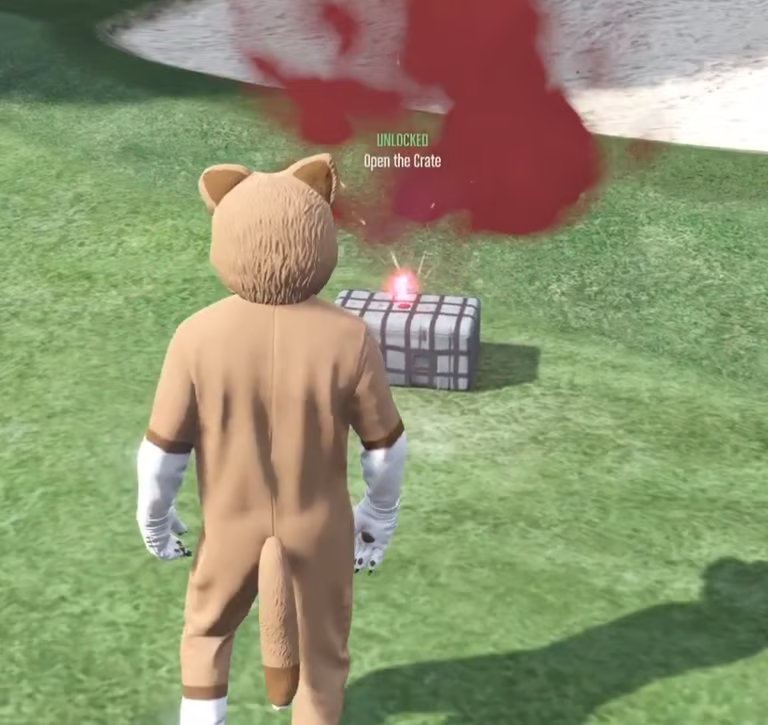

A modern, configurable airdrop system for FiveM.
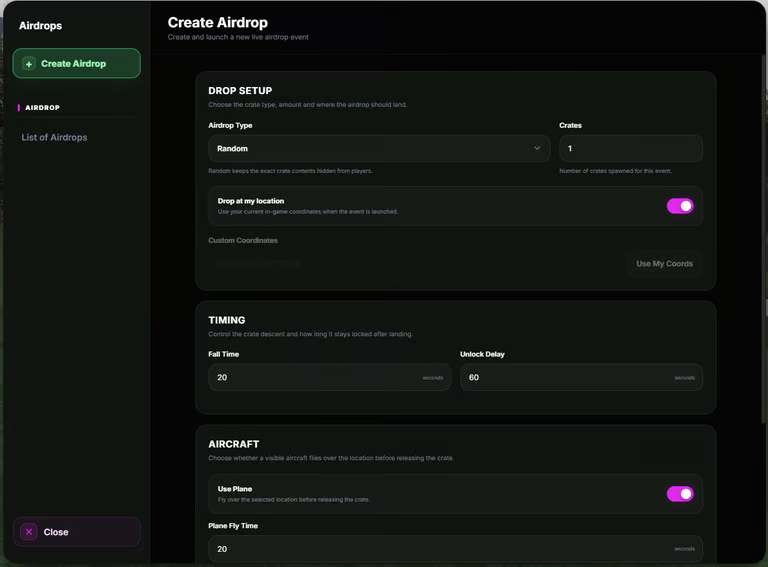
Otters Airdrop gives server owners a complete supply drop system with aircraft fly-ins, parachuting crates, configurable loot, KOS zones, live broadcasts and a full admin management panel.
Create airdrops anywhere on the map, choose the loot tier, configure unlock timings and manage every active drop directly through the custom interface.
With support for QBCore, Qbox and ESX, multiple inventory and target integrations, configurable notifications, Discord logging and Asset Escrow-friendly configuration, Otters Airdrop is designed to be easy to install and easy to customise.
Features
Modern custom airdrop management UI
QBCore, Qbox & ESX support
Automatic framework detection
Configurable loot tiers
Configurable item quantities
Multiple simultaneous airdrops
Titan aircraft fly-in system
Configurable aircraft model
Configurable aircraft speed & height
Optional aircraft map blip
Parachuting supply crates
Configurable drop timings
Configurable unlock timings
Live airdrop status
Live landing countdown
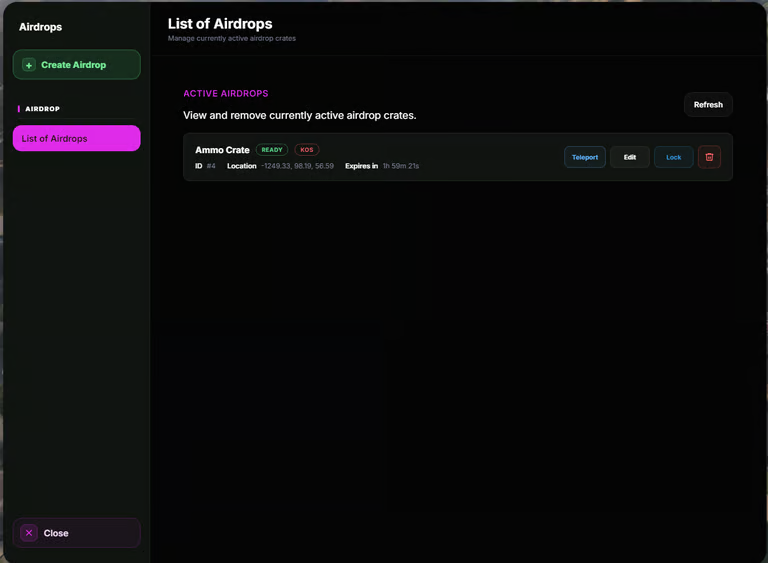
Active airdrop management panel
Edit active airdrops
Lock & unlock crates
Delete active airdrops
Teleport to active airdrops
Configurable KOS zones
Configurable KOS radius
KOS zone removal delay after looting
Server-wide incoming airdrop broadcasts
Server-wide looted broadcasts
Crate map blips
Configurable radius zones
Supply crate flare effects
Locked crate hologram
Multiple inventory integrations
Multiple target integrations
Multiple notification integrations
Press E interaction fallback
Optional key item requirements
Optional unlock minigame
Configurable minimum player requirement
Configurable airdrop cooldowns
ACE permission support
Discord webhook logging
Configurable UI theme
Server-side loot validation
Aircraft Airdrop System
Otters Airdrop isn't simply a crate spawning command.
When an airdrop is created, a configurable aircraft can fly toward the selected location before releasing the supply crate.
The default aircraft is:
Titan
The aircraft travels toward the drop location before releasing the crate, allowing players to see the airdrop arriving rather than having a supply crate simply appear on the ground.
Server owners can configure:
Aircraft Model • Flight Height • Aircraft Speed • Approach Distance • Fly-Away Distance • Aircraft Blip
The aircraft system can also be disabled completely if your server prefers instant crate drops.
Parachuting Supply Crates
Once the aircraft reaches the airdrop location, the supply crate is released and begins descending toward the ground.
Players can visually follow the crate while it falls before it safely settles onto the surface below.
The crate system includes:
Parachute Descent • Surface Detection • Landing Correction • Flare Effects • Map Blips • Radius Zones • Locked Hologram
The system continuously checks the crate position after landing to help prevent crates remaining incorrectly suspended above the ground.
Configurable Loot Tiers
Create different levels of airdrops using configurable loot tiers.
For example:
Common • Rare • Epic • Military • Event • Custom
Each tier can contain its own selection of items and quantities.
You can configure:
Item Name • Minimum Quantity • Maximum Quantity
This allows different airdrops to offer completely different rewards depending on the event or server economy.
Loot is validated server-side before being awarded.
Active Airdrop Manager
Authorised staff can manage active airdrops directly through the custom interface.
Each active airdrop displays useful information including:
Airdrop ID • Status • Location • Landing Timer • Unlock Timer • KOS Status
Staff can manage drops without needing to restart the resource or manually modify anything through the database or console.
Available management actions include:
Edit • Lock • Unlock • Teleport • Delete
Live Airdrop Status
The management panel displays the current physical stage of each airdrop.
Possible states include:
Inbound • Falling • Locked • Ready
The landing timer updates alongside the actual crate descent, helping ensure the interface accurately represents what players are seeing in-game.
Once the crate has landed, the status automatically changes depending on whether the crate is still locked or ready to loot.
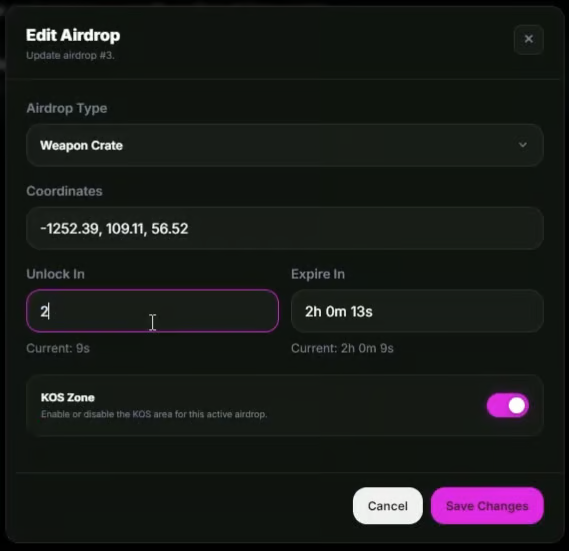
Edit Active Airdrops
Active airdrops can be edited while they are running.
Staff can adjust settings such as:
Unlock Timing • KOS Status • Other Supported Drop Settings
Changes are applied to the active airdrop without requiring the drop to be deleted and recreated.
This allows staff to quickly correct or adjust a live event.
Lock & Unlock Crates
Airdrop crates can be configured to remain locked for a set amount of time after landing.
The unlock duration can be configured when the drop is created.
Staff can also manually:
Lock • Unlock
active crates directly from the management panel.
The system continuously synchronises the crate's latest unlock state so edited timings are applied correctly.
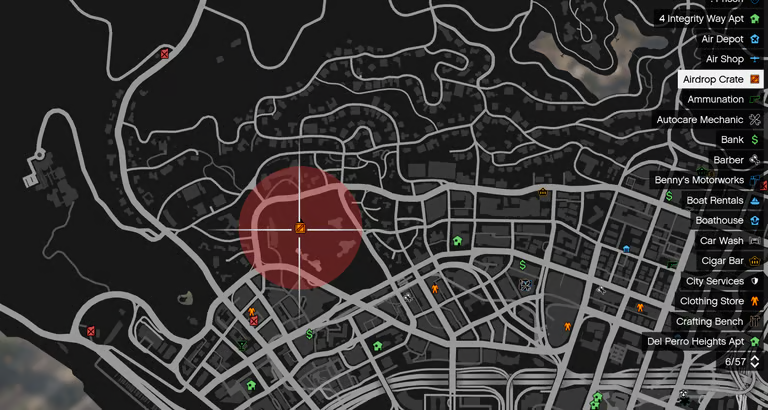
KOS Zones
Airdrops can optionally create a Kill On Sight zone around the drop location.
When enabled, a configurable red radius zone is displayed around the active airdrop.
This makes it easy to clearly identify PvP areas during supply drop events.
Configure your own:
Default KOS Setting • KOS Radius • Zone Behaviour • Post-Loot Removal Delay
After a crate is looted, the KOS zone can remain visible for a configurable number of seconds before disappearing.
Server-Wide Broadcasts
Players can automatically receive notifications when important airdrop events occur.
Broadcasts can be configured for events such as:
Airdrop Incoming • Airdrop Looted
This lets players know when a new supply drop has entered the map and when somebody has successfully claimed it.
Broadcast text can be customised through the configuration.
Notification Integrations
Otters Airdrop supports multiple notification systems.
Choose your preferred integration directly inside the configuration:
Cfg.Integrations = {
    inventory = 'auto',  -- auto | ox_inventory | qb-inventory | qb | qbx | esx | none
    target    = 'auto',  -- auto | ox_target | qb-target | none
    notify    = 'system' -- system | ox_lib | okok | qb | qbx | esx | mythic | chat
}
Supported notification options include:
Built-In System • ox_lib • okokNotify • QBCore • Qbox/QBX • ESX • mythic_notify • Chat
The built-in notification system also supports configurable screen positioning.
Inventory Integrations
Otters Airdrop can automatically detect supported inventory resources.
Supported options include:
ox_inventory • qb-inventory • QBCore • Qbox/QBX • ESX
Inventory integration can also be manually selected through the config if preferred.
Loot rewards are processed server-side and checked before being awarded to the player.
Target Integrations
Crates can be interacted with using supported target resources.
Supported options include:
ox_target • qb-target
Servers that do not use a supported target resource can use the built-in Press E interaction fallback instead.
This allows Otters Airdrop to work across a wider range of server setups without requiring an additional target dependency.
Optional Unlock Requirements
Server owners can configure additional requirements before players are allowed to open an airdrop.
This can include:
Required Item • Unlock Minigame
These options can be enabled or disabled depending on the type of gameplay your server wants.
This makes it possible to create standard supply drops or more difficult high-value drops requiring additional player interaction.
Minimum Players & Cooldowns
Control how frequently airdrops can be created.
Configure:
Minimum Online Players • Airdrop Cooldown
This allows servers to prevent airdrop events from being triggered when player population is too low or too frequently.
Staff Permissions
Access to the Airdrop Management Panel can be controlled using FiveM ACE permissions.
Example:
add_ace group.admin otters_airdrop.admin allowThis keeps Otters Airdrop permissions separate from individual framework admin systems and makes it easy to integrate with your existing server permission setup.
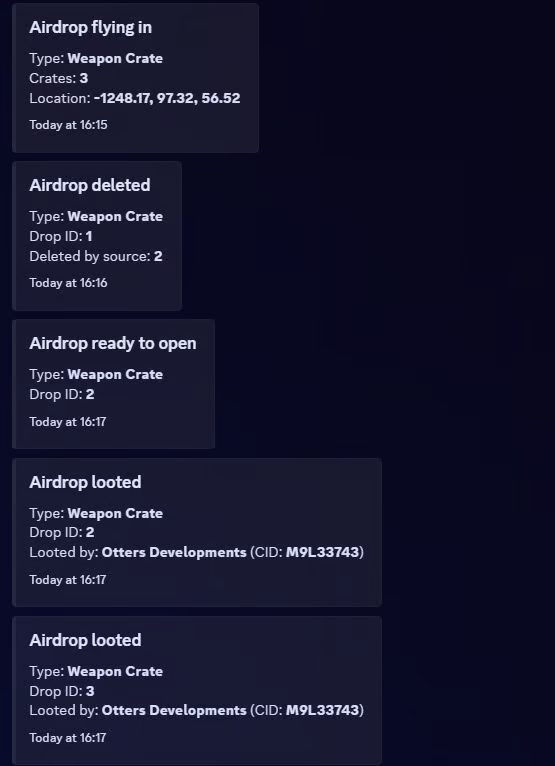
Discord Logging
Keep track of important airdrop activity through configurable Discord webhook logging.
Logs can be sent for events including:
Aircraft Incoming • Crate Ready • Crate Looted
Discord logging can be enabled, disabled and configured directly through the resource.
Multi-Framework Support
Built for:
QBCore • Qbox • ESX
Framework detection can be handled automatically, reducing the amount of setup required when installing the resource.
Manual framework selection is also available if required.
Highly Configurable
Configure your own:
Framework • Inventory • Target • Notifications • Aircraft • Loot Tiers • Item Quantities • Drop Timings • Unlock Timings • KOS Zones • Broadcasts • Blips • Radius Zones • Minimum Players • Cooldowns • Permissions • Discord Logging
The custom UI theme can also be edited separately to match your server's branding.
Standalone Configuration
Otters Airdrop is designed so server owners do not need to modify their framework or other resources to configure the airdrop system.
Framework support, integrations, aircraft settings, loot, permissions, notifications and gameplay options are handled directly through Otters Airdrop.
The following files remain accessible for server owners:
config.lua • theme.css
The remaining supported resource files can be distributed through FiveM Asset Escrow.
Documentation
Full installation instructions, configuration options and feature guides are available through the Otters Developments documentation.
Support
Need help, found a bug or want to keep up with future releases?
Join the Otters Developments Discord
OTTERS DEVELOPMENTS
Developed by BranTheOtter